

Never know what to type into ChatGPT? This simple beginner guide shows you exactly how to use it with real examples, clear prompts, and no jargon.
If you only remember one thing from this article
- ChatGPT is not Google.
- Don’t type keywords
- Talk to it like a person
That one change will improve your results immediately.
Let me show you what usually happens
You’ve heard about ChatGPT everywhere.
At work. From friends. On YouTube. Even on TV.
So one day, you decide to try it.
You open the website.
You create an account.
You see the blank white box.
And then… nothing.
What do you type?
You try something simple:
“Write me an email”
It asks for more details.
You try again. Still not great.
After a few minutes, you close the tab and think:
“Maybe this isn’t for me.”
Sound familiar?
You’re not alone.
And more importantly:
It’s not your fault
Most tools are built by technical people.
They are not always explained in a simple way.
That’s what this guide is for.
What is ChatGPT (simple explanation)
ChatGPT is an AI tool you can talk to.
You type something.
It responds.
You can use it to:
- Write
- Explain
- Plan
- Generate ideas
Think of it like this:
A smart assistant that understands instructions
The biggest mistake beginners make
Most people use ChatGPT like Google.
They type:
- “best laptop”
- “email example”
- “ideas”
That works on Google.
It does NOT work well on ChatGPT.
The simple shift that changes everything
Instead of typing keywords…
👉 Talk to ChatGPT like you’re texting a knowledgeable friend
Example
Instead of:
❌ “Italian restaurant Sydney”
Say:
Can you suggest a good Italian restaurant in Sydney? I’m looking for somewhere relaxed, not too expensive, and suitable for a small birthday dinner

See the difference?
- You are giving context
- You are explaining your need
And that gives you a much better answer.
Think of ChatGPT like this
Imagine a friend who:
- Has read almost everything
- Knows a little about many topics
- Has unlimited patience
- Never gets tired of your questions
That’s ChatGPT.
It’s not perfect.
But for:
- Explaining
- Writing
- Planning
- Thinking things through
It is incredibly useful.
How to actually start using ChatGPT
If you haven’t tried it yet, here’s how:
- Go to chat.openai.com
- Create a free account
- Type something in the box
- Press Enter
That’s it.
There is no “wrong way” to start.
The real secret: give it context
This is where most people go wrong.
They are too vague.
Think about this:
If you ask a friend:
“Help me write something”
They won’t know where to start.
But if you say:
I need to write a thank you message to my neighbour who helped me move. I want it to sound warm and personal.
Now they can help properly.
ChatGPT works the same way
A simple formula you can use every time
When you ask ChatGPT, try to include:
- What you need
- Why you need it
- Who it is for
- How you want it
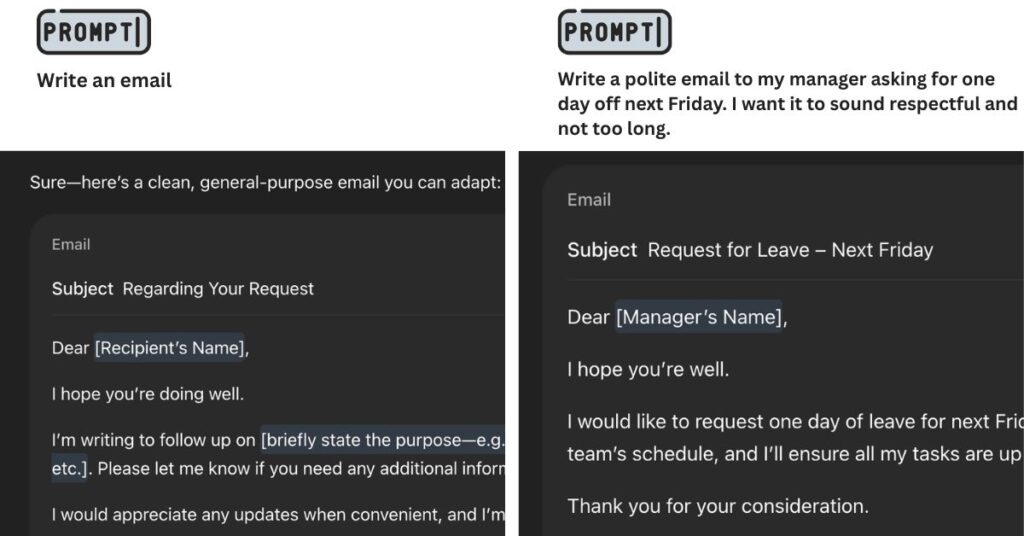
Example
❌ “Write an email”
Write a polite email to my manager asking for one day off next Friday. I want it to sound respectful and not too long.
Same request. Much better result.
10 practical ways to use ChatGPT (start here)
You don’t need 100 ideas.
Start with these.
1. Explain confusing things
Got a letter you don’t understand?
Ask:
Can you explain this in simple terms?
2. Write emails quickly
Write a polite email asking for a refund. Keep it firm but respectful.
3. Plan a trip
Plan a 5-day trip to Rome. I like history, food, and quieter places.
4. Learn something new
Explain how interest rates work in simple terms.
5. Decide what to buy
I want a laptop for basic use under $800. What should I look for?
6. Cook with what you have
I have chicken, pasta, and tomatoes. What can I cook?
7. Write personal messages
Help me write a message to reconnect with an old friend.
8. Prepare for conversations
Give me questions to ask my doctor about blood pressure.
9. Improve your writing
Check this email and make it sound more professional.
10. Think through decisions
Help me decide whether to change jobs. Give pros and cons.
These are the most common real-life uses of ChatGPT
One trick that makes everything better

You can ask ChatGPT to improve its answer.
Try saying:
- “Make it shorter”
- “Make it simpler”
- “Change the tone”
- “Give another version”
It will adjust.
You are allowed to guide it
Common mistakes to avoid
- Asking very short questions
- Not giving context
- Expecting perfect results immediately
- Not checking the answer
Remember:
Better input = better output
Is ChatGPT always correct?
No.
Sometimes it:
- Gives wrong information
- Sounds confident but is incorrect
So always:
- Double-check important facts
- Use it as a helper, not the final answer
Your first 5-minute exercise
If you’re new, try this:
Type:
Hi, I’m new to ChatGPT. Suggest 5 simple ways I can use it in daily life.
Pick one idea.
Try it.
That’s how it starts.
Quick recap
- ChatGPT is a tool you talk to
- It works best with clear instructions
- Give context for better results
- You can use it for everyday tasks
- You don’t need technical skills
Final thought
The biggest mistake people make with ChatGPT…
Is not using it at all.
Not because it’s hard.
But because they feel unsure.
Start small.
Ask something simple.
That’s all it takes.
Next step
👉 Read next:
What Is AI? (Simple Explanation for Beginners)